Case file — PRJ-013
Tuition.io × edX.
Tuition.io administers education benefits for employers. Their members get discounted access to edX programmes — and that offer needed a page that lived on edX, looked like both brands, and told a member exactly how to claim it.
The brief
This is a partner page, which means two brands, two sets of guidelines and one reader who does not care about either. A Tuition.io member arriving here has one question: what do I get, and how do I claim it? Everything else is noise. The page also had to be built inside edX’s enterprise WordPress environment, to their conventions, not ours.
The build
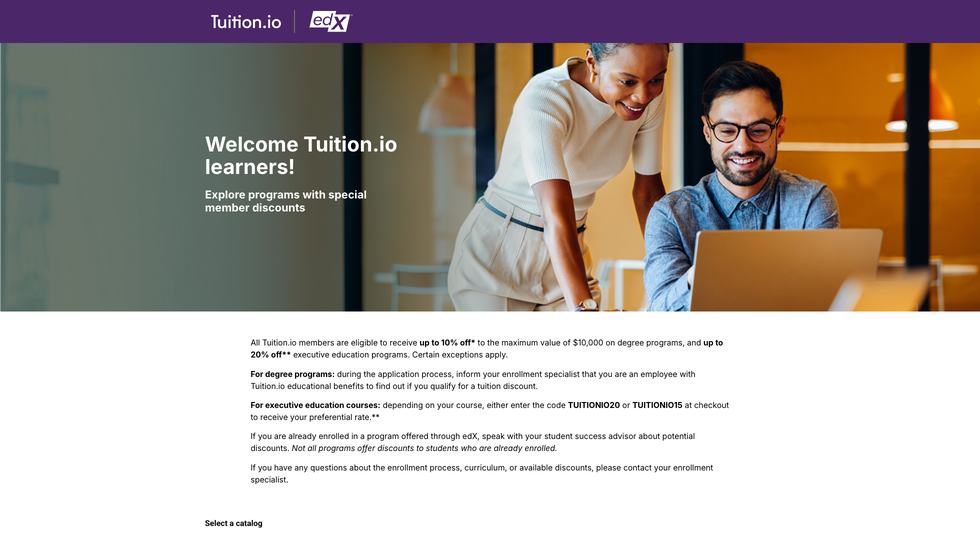
Co-branded header, a plain statement of the discount, and the claim mechanics broken out by programme type — degree programmes handled by an enrolment specialist, executive education handled by a checkout code. The catalogue selector sits directly beneath so a member moves from understanding the benefit to choosing a course without leaving the page.
Scope of work
- S-01DEVELOPMENT
Built inside the edX enterprise WordPress environment, to the platform’s own conventions.
- S-02CO-BRANDING
Two brand systems in one header without either being subordinated.
- S-03CONTENT DESIGN
The offer stated in plain terms, with the claim steps separated by programme type.
- S-04INTEGRATION
Catalogue selection wired into the page so the benefit and the courses sit together.
The details that mattered
- Two brands, one reader. A co-branded lockup that respects both guideline sets, then gets out of the way of the actual offer.
- The discount, stated plainly. Up to 10% on degree programmes and up to 20% on executive education, with the exceptions named rather than buried in a footnote.
- Claiming it is the hard part. Degree and executive routes work differently, so they are separated. A member never has to work out which instruction applies to them.
- Their house, their rules. Built to edX’s platform conventions so their team maintains it after handover without relearning anything.
Quick answers
What did the Tuition.io partner page involve?
Development of a co-branded partner landing page inside the edX enterprise WordPress environment: a two-brand header, a plain statement of the member discount, claim instructions separated by programme type, and an integrated catalogue selector.
Can you build inside a client’s existing platform?
Yes, and we prefer to when the platform is sound. The edX work — both the enterprise site and this partner page — was built to their conventions inside their environment, which is why their own team has maintained it since handover without calling us.